




You’ve filled out your profile and now want to know if your partner shares similar preferences? Then the Comparison is your most powerful tool!
Before getting started, choose one of the two comparison modes:
- LustList: A comprehensive comparison that displays your specific common ground in detail.
- LustScore: A more anonymous comparison that only reveals an overall percentage (%) of your compatibility at the end, without disclosing specific practices.
Here, we guide you step-by-step through how the detailed LustList comparison works.
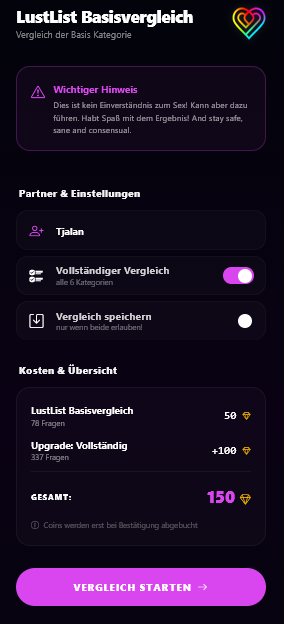
Choose Options
After tapping "Comparison" in the dashboard, first enter your partner's name so you can easily organize and identify the result later.
Then select your options: Would you like to compare only the free basic category, or start a Full Comparison of all 6 categories (using Coins)? You can also decide whether the result should be saved.
Invite & Confirm
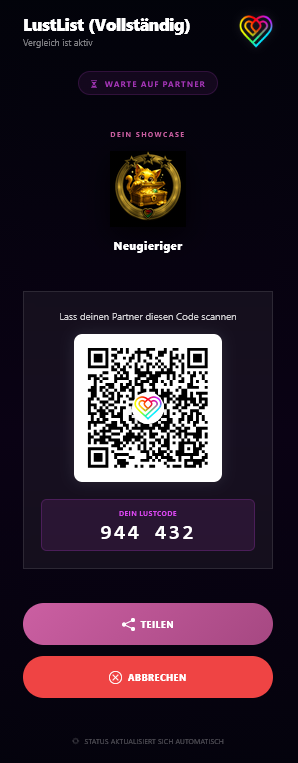
As soon as you launch the comparison, the app generates a secure invitation screen displaying your personal 6-digit LustCode and a large QR code.
Your partner can now scan this QR code directly with any standard camera app or enter the LustCode directly into their own app. Once your partner confirms on their device, you're ready to go!
The Match Score
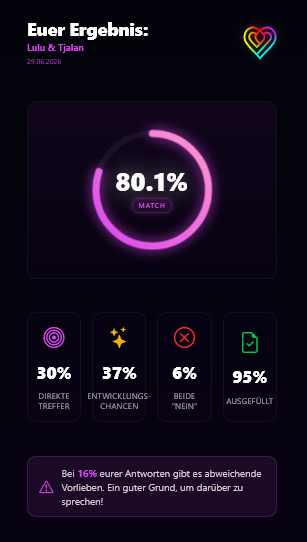
Once connected, the algorithm works its magic! You will now see your shared result.
The prominent ring directly shows your match percentage. Beneath it, you will find a detailed breakdown: How many direct matches were there? What is your potential for exploration (where one answered "Yes" and the other "Maybe")? And how often did both of you indicate a clear "No"?
Total Privacy: Only Matches Are Displayed!
The cornerstone principle of LustLink is: Your secrets are safe!
✓ Matches
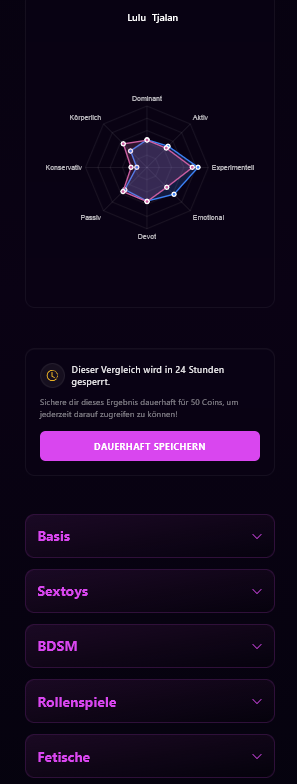
In the detailed results (beneath the radar chart), you can expand individual categories. There, only the practices where both of you answered "Yes" or "Maybe" will be displayed!
✗ Taboos Remain Invisible
If you say "Yes" to something but your partner says "No" (or vice versa), that item will not appear at all in the results. You never have to justify or feel ashamed of desires your partner does not share.
📢 The Outing Exception
The only exception is the Outing symbol. If you selected this during profile setup, that preference is forced to appear in the results—ideal for absolute must-haves or non-negotiable boundaries.
Helpful article?
Loading ratings...